
Desi Aroma
Designed a service model that empowered homemakers to earn from home-cooked meals while making affordable food accessible to students.
Founded by two NID alumni, Desi Aroma is a community-driven initiative that empowers housewives in Gandhinagar by transforming their love for home-cooked food into a source of income and recognition, while serving affordable, wholesome meals to students.
Revamping a medical product for the US market to ensure ADA compliance and drive wider adoption.
My client, who offers a Medicare product suite for the U.S. market, was facing challenges because their offerings X not ADA-compliant. As the UX Lead on this project, I led the redesign of their flagship medical product and conducted UAT with real users of assistive technologies who have visual disabilities.
Client
Student Project
Duration
2 Months
Industry
Social Innovation
Scope of Work
Service Design
System Design Design
Brand Design
Mobile App
UX/UI
Video Production
🏆 Second Runner-Up User Interface Design Category

From concept to scalable experience.

Objective
Creating Economic Opportunities for Housewives While Meeting Student Needs
Many women in Gandhinagar were looking for flexible ways to earn an income while managing their families, while many students lived away from home and missed the comfort of home-cooked food.
We saw food as the natural connection between these two communities and explored how homemade food could bring the feeling of home to students while creating flexible earning opportunities for women.
System Mapping
System-Level Analysis of gandhinagar
Primary & Secondary Research • Focus Groups • System Mapping • Insights Articulation • Opportunity Mapping
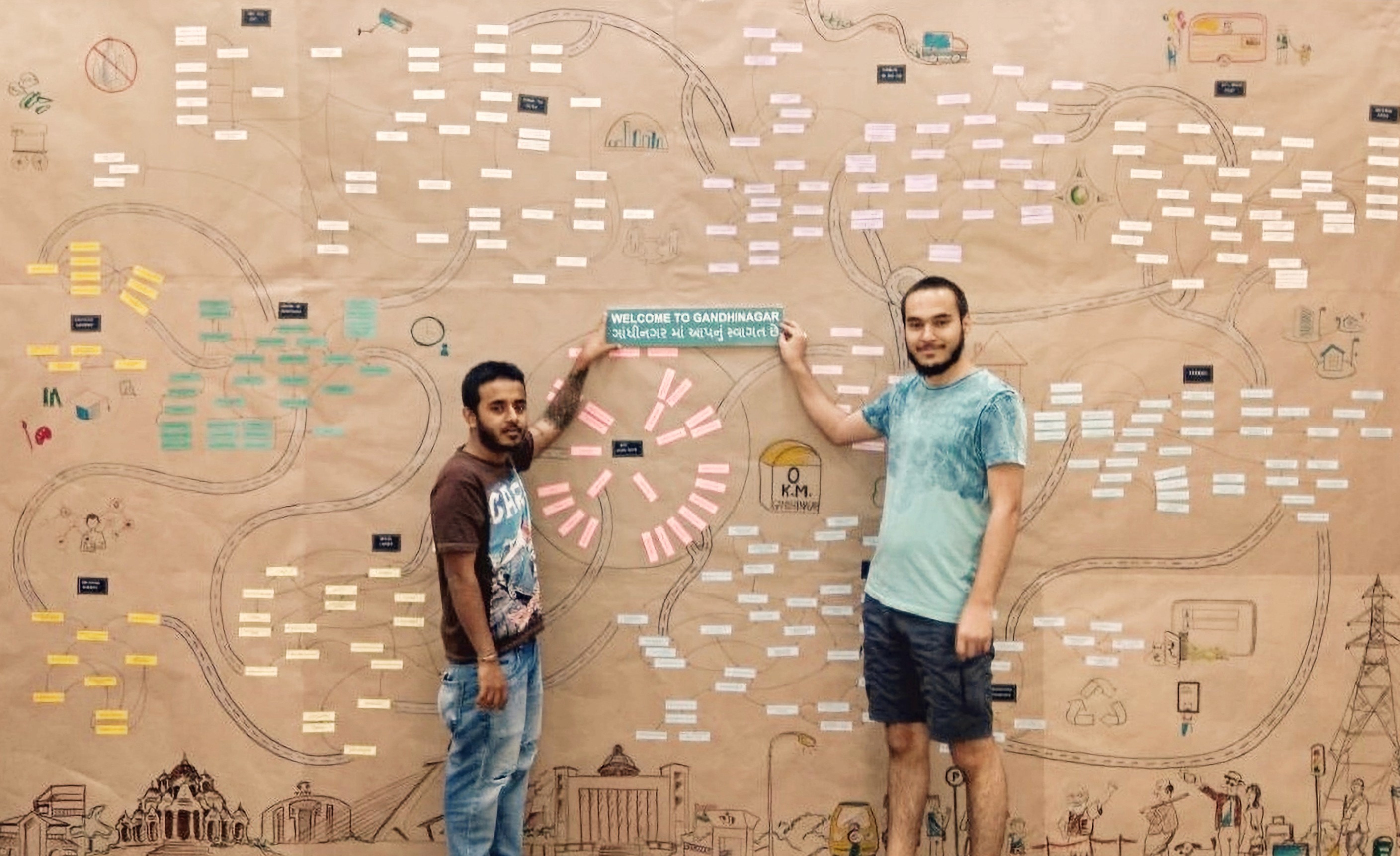
The above shows a system map of Gandhinagar.
System Mapping
System-Level Analysis of gandhinagar
Primary & Secondary Research • Focus Groups • System Mapping • Insights Articulation • Opportunity Mapping
User Research
From Observations to Insights
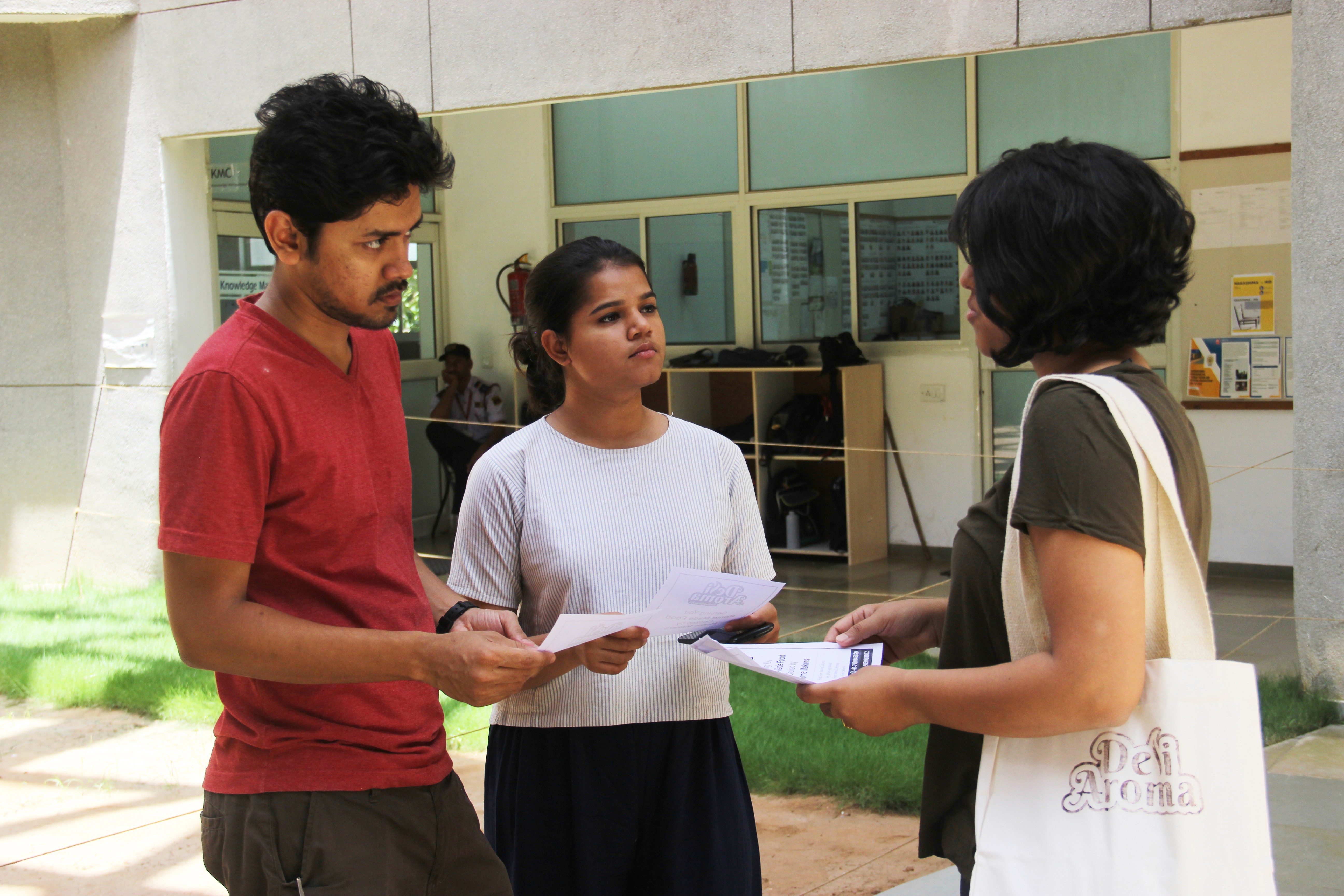
Synthesizing user interviews and discussions to uncover patterns, needs, and opportunities that informed design decisions.
- Limited time to cook → dependence on restaurants
- Carrying home-cooked food leads to cold, soggy meals
- Strong need for fresh, homemade food
- Existing services lack authentic home-style taste
- Willingness to pay ₹100–₹150 for non-veg meals
- Cost sensitivity; preference for simple packaging
- Quantity transparency expected in online menus
- Demand for personalization and portion options
- Family approval is critical for homemakers' participation
- Homemakers' schedules revolve around family needs
- Retired individuals seek meaningful engagement
- Stored homemade snacks fit anytime consumption needs
- Cook selection is key to consistent homemade taste
- Limited local market → right customer targeting needed
- Importance of tracking customer preferences
- Loyalty requires assurance and stability for home chefs
- Limited time to cook → dependence on restaurants
- Carrying home-cooked food leads to cold, soggy meals
- Strong need for fresh, homemade food
- Existing services lack authentic home-style taste
- Willingness to pay ₹100–₹150 for non-veg meals
- Cost sensitivity; preference for simple packaging
- Quantity transparency expected in online menus
- Demand for personalization and portion options
- Family approval is critical for homemakers' participation
- Homemakers' schedules revolve around family needs
- Retired individuals seek meaningful engagement
- Stored homemade snacks fit anytime consumption needs
- Cook selection is key to consistent homemade taste
- Limited local market → right customer targeting needed
- Importance of tracking customer preferences
- Loyalty requires assurance and stability for home chefs
User Research
From Observations to Insights
Synthesizing user interviews and discussions to uncover patterns, needs, and opportunities that informed design decisions.
Comparative Analysis
From Existing Services to New Opportunities
Benchmarking existing food services to understand the landscape, gaps, and opportunities for a community-driven model.
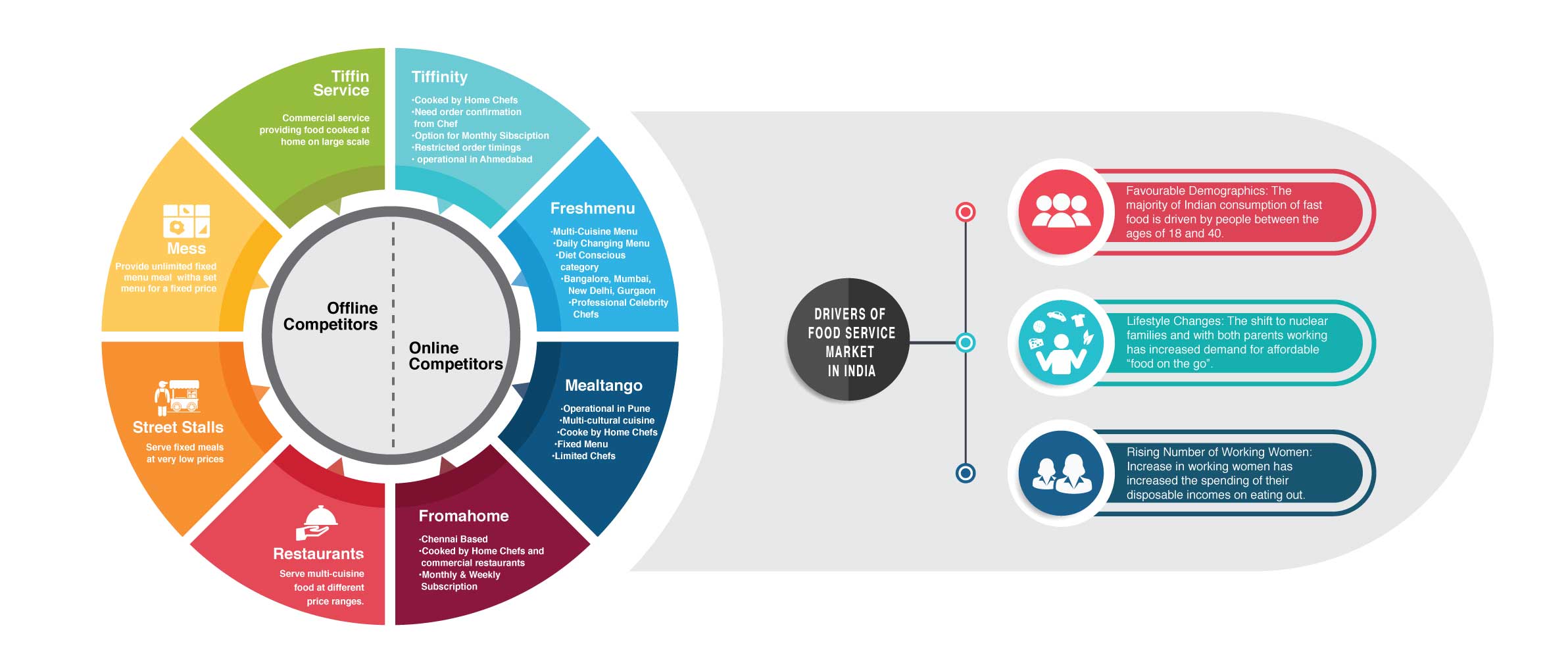
*Original artifacts shown as-is in 2018, not recreated. Please use the custom-built zoom feature to view the research text in detail.
Comparative Analysis
From Existing Services to New Opportunities
Benchmarking existing food services to understand the landscape, gaps, and opportunities for a community-driven model.
*Original artifacts shown as-is in 2018, not recreated. Please use the custom-built zoom feature to view the research text in detail.
Stakeholder Mapping
From Stakeholders to Service Ecosystem
Mapping key stakeholders, relationships, and interactions to understand how the service could function within the wider ecosystem.
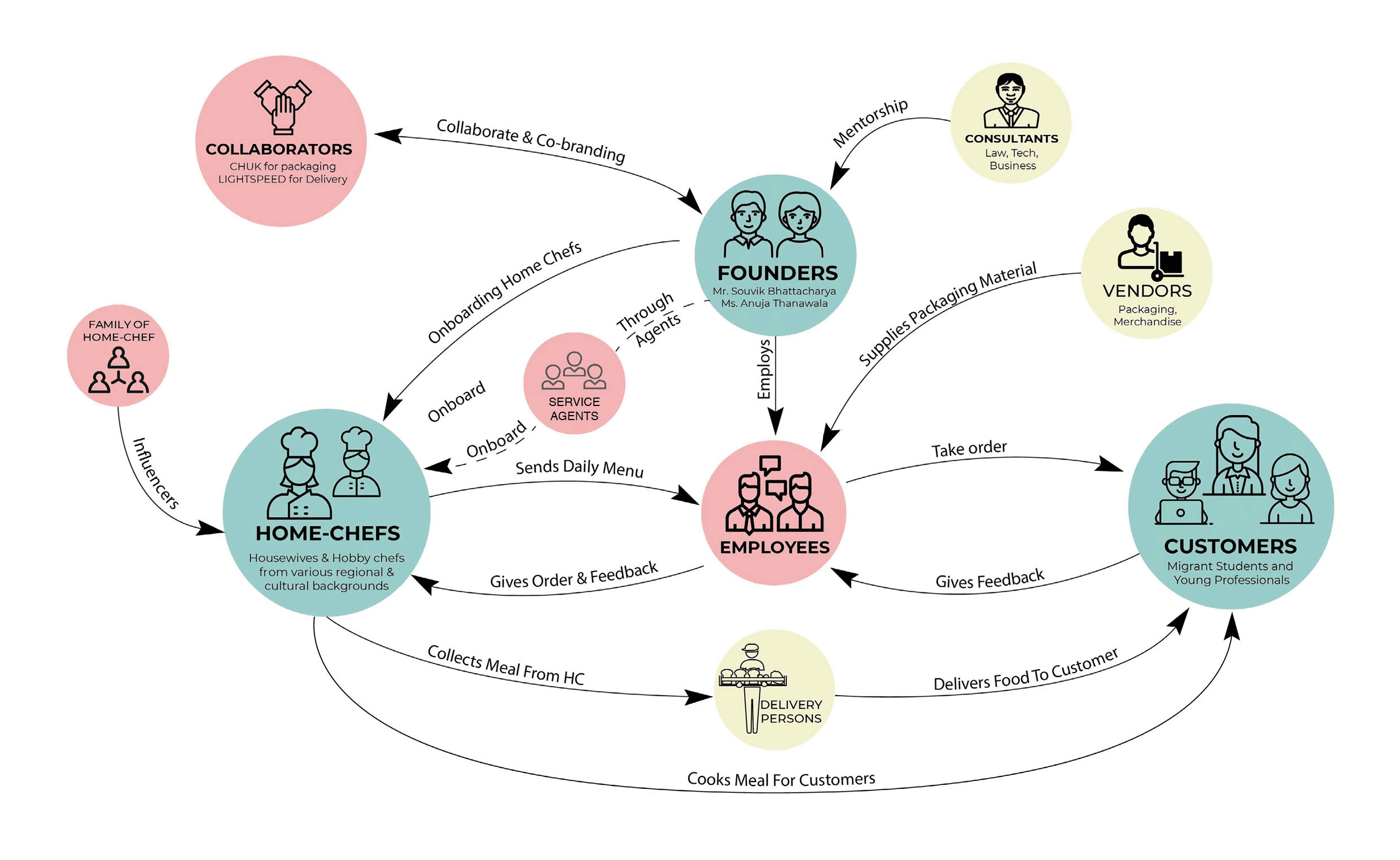
*Original artifacts shown as-is in 2018, not recreated. Please use the custom-built zoom feature to view the research text in detail.
Stakeholder Mapping
From Stakeholders to Service Ecosystem
Mapping key stakeholders, relationships, and interactions to understand how the service could function within the wider ecosystem.
*Original artifacts shown as-is in 2018, not recreated. Please use the custom-built zoom feature to view the research text in detail.
Journey Mapping
From Individual Journeys to Shared Experiences
Mapping the end-to-end experiences of home chefs and customers to uncover pain points, expectations, and opportunities.
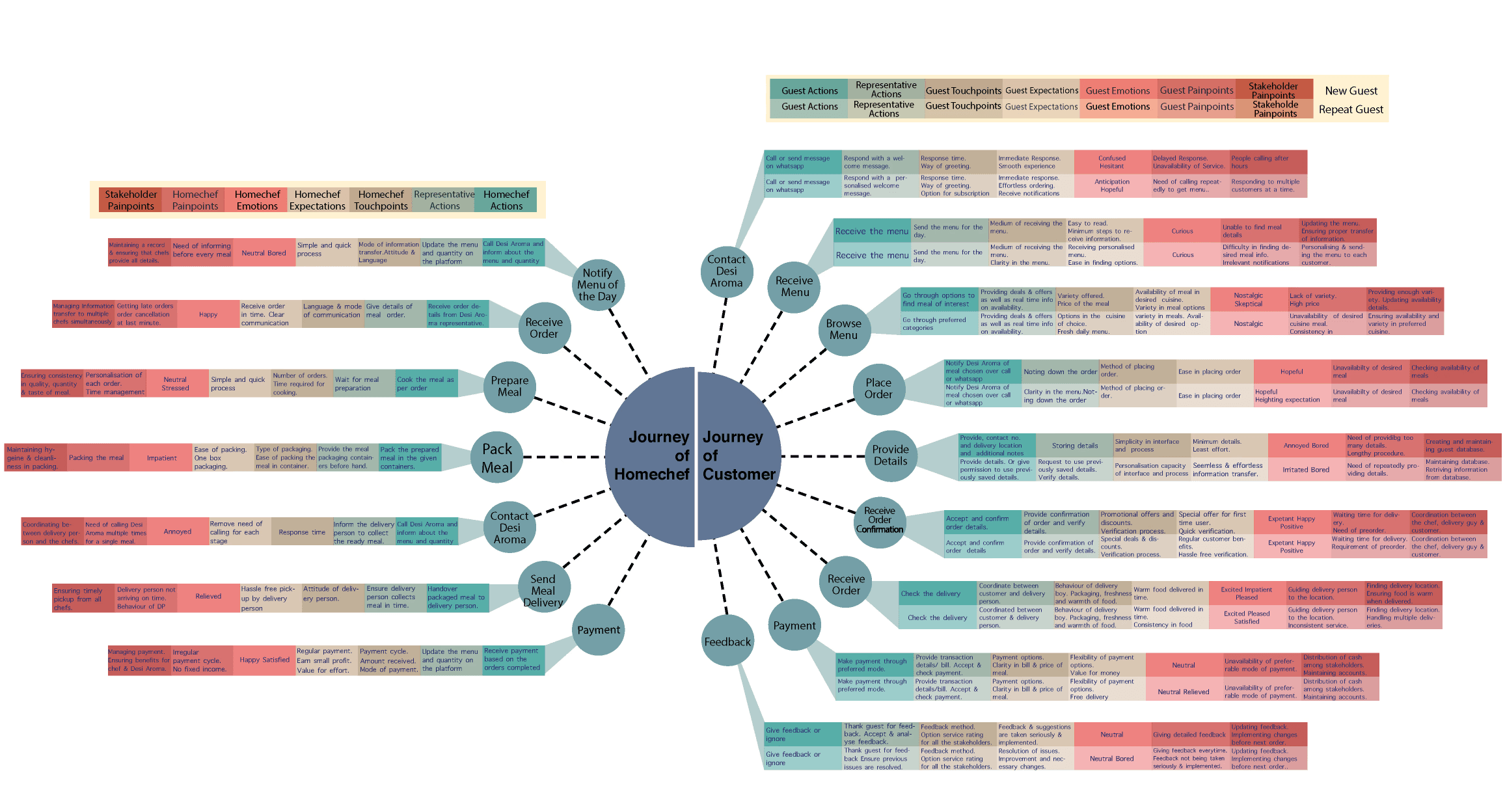
*Original artifacts shown as-is in 2018, not recreated. Please use the custom-built zoom feature to view the research text in detail.
*Original artifacts shown as-is in 2018, not recreated. Please use the custom-built zoom feature to view the research text in detail.
Service Blueprint
From Experiences to Service Operations
Translating customer and chef journeys into the operational processes and touchpoints needed to deliver the service.
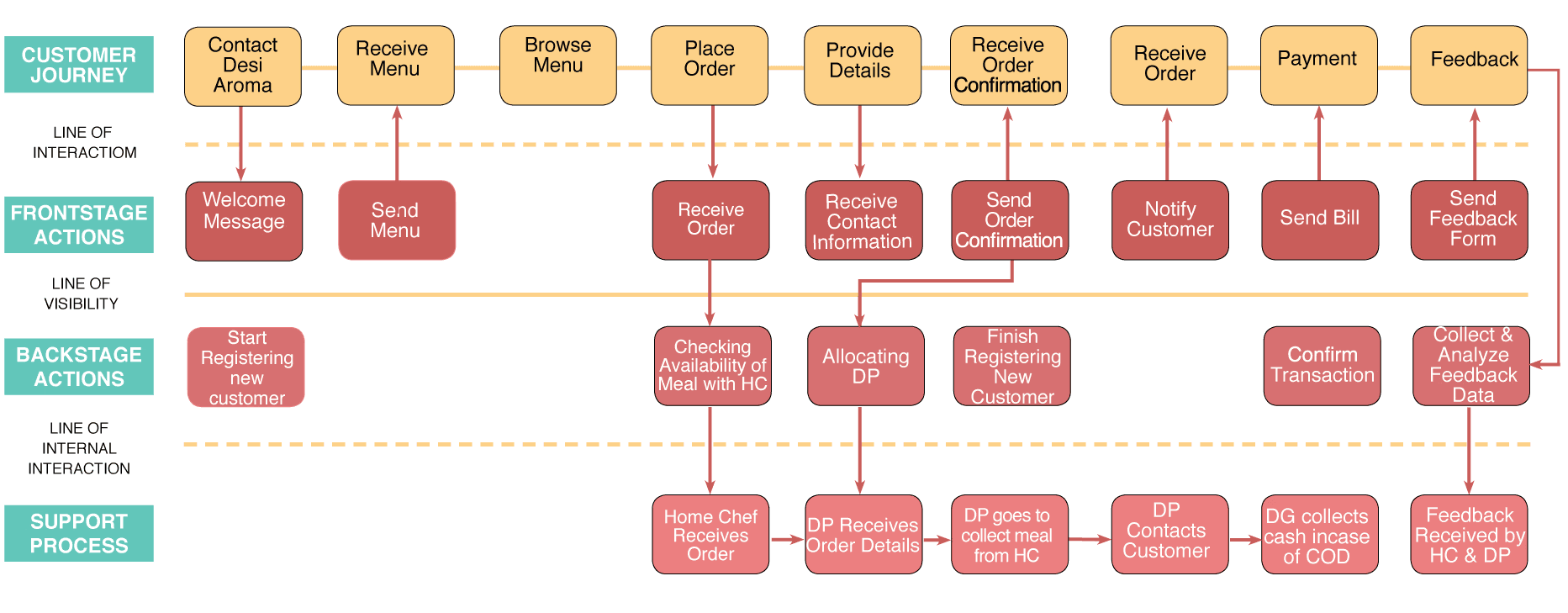
*Original artifacts shown as-is in 2018, not recreated. Please use the custom-built zoom feature to view the research text in detail.
Brand Building
From Service Concept to Brand Identity
Translating the service concept into a cohesive brand through identity, communication, packaging, and marketing touchpoints.
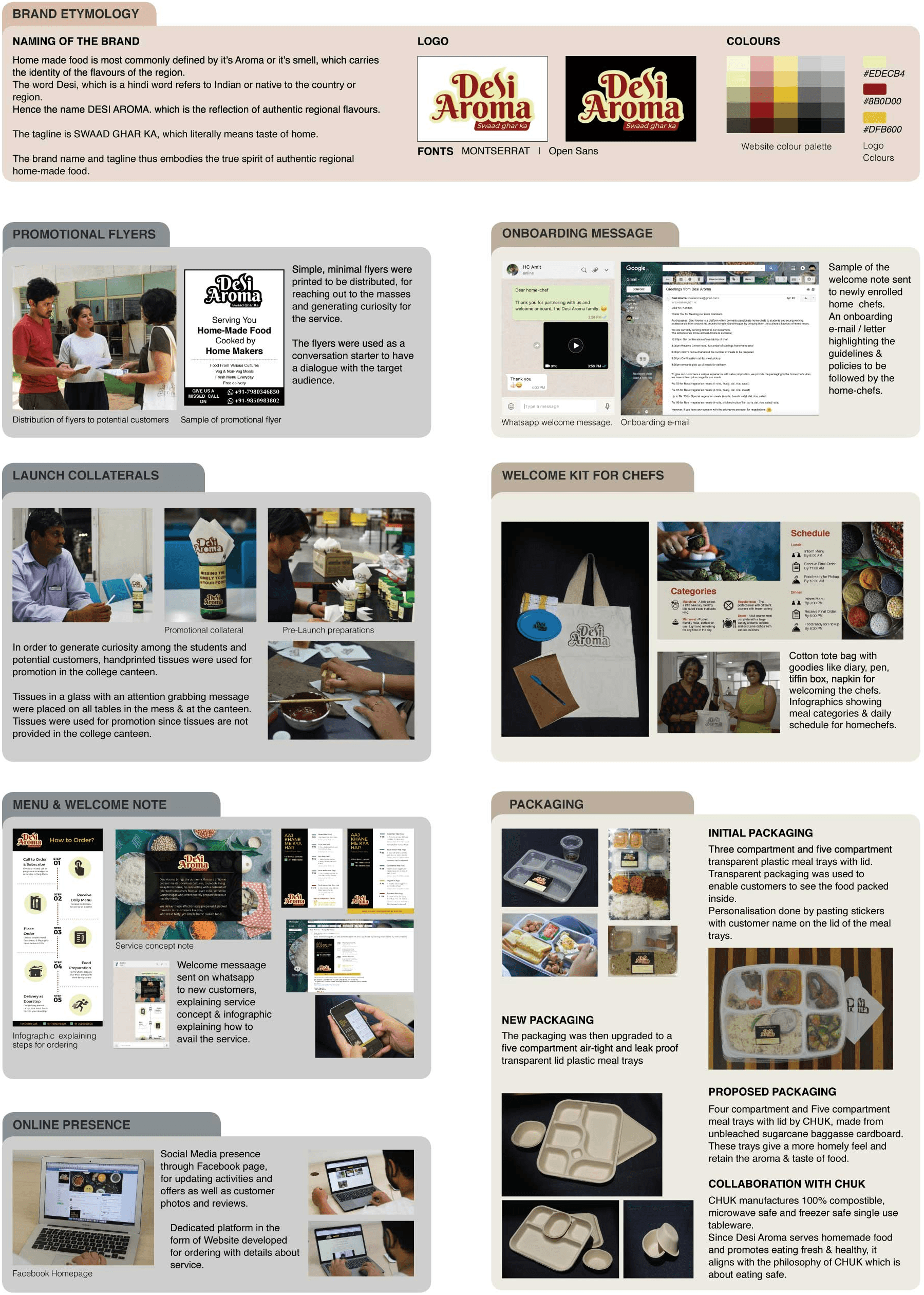
*Original artifacts shown as-is in 2018, not recreated. Please use the custom-built zoom feature to view the research text in detail.
*Original artifacts shown as-is in 2018, not recreated. Please use the custom-built zoom feature to view the research text in detail.
Concept Video
From Concept to Story
Bringing the service concept to life through a short video that communicates its value, vision, and experience to stakeholders.
Concept Video
From Concept to Story
Bringing the service concept to life through a short video that communicates its value, vision, and experience to stakeholders.
Key Service Metrics
10
Service POC
Duration
6
Home
Chefs
135
Total
Orders
81
Total Customers
62%
Repeat Customers
Key Service Metrics
10
POC
Duration
6
Home
Chefs
135
Total
Orders
81
Total Customers
62%
Repeat Customers
Interface Design
From Service to Product
User Persona • User Flows • Wireframing • Design System • Prototyping • User Testing
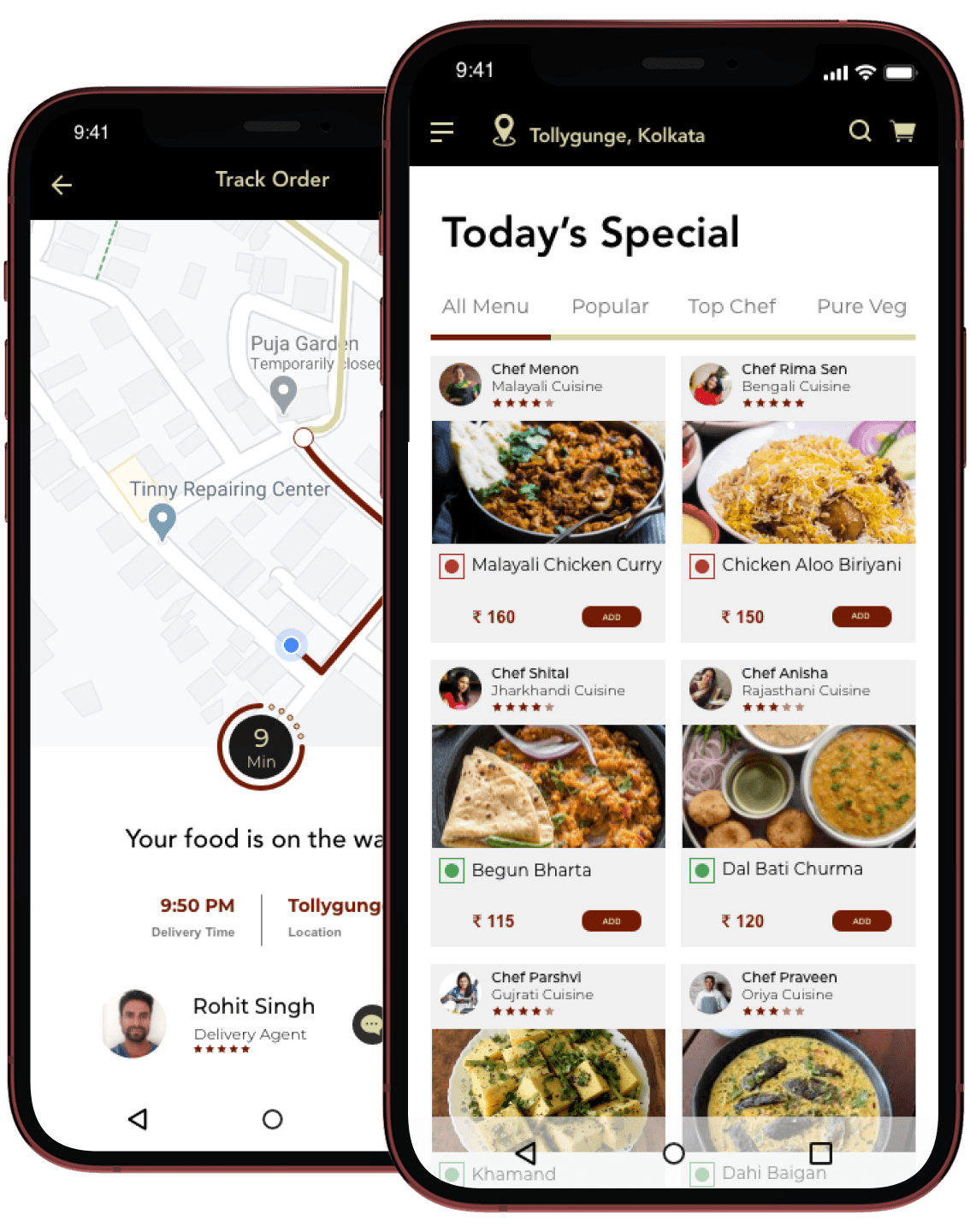
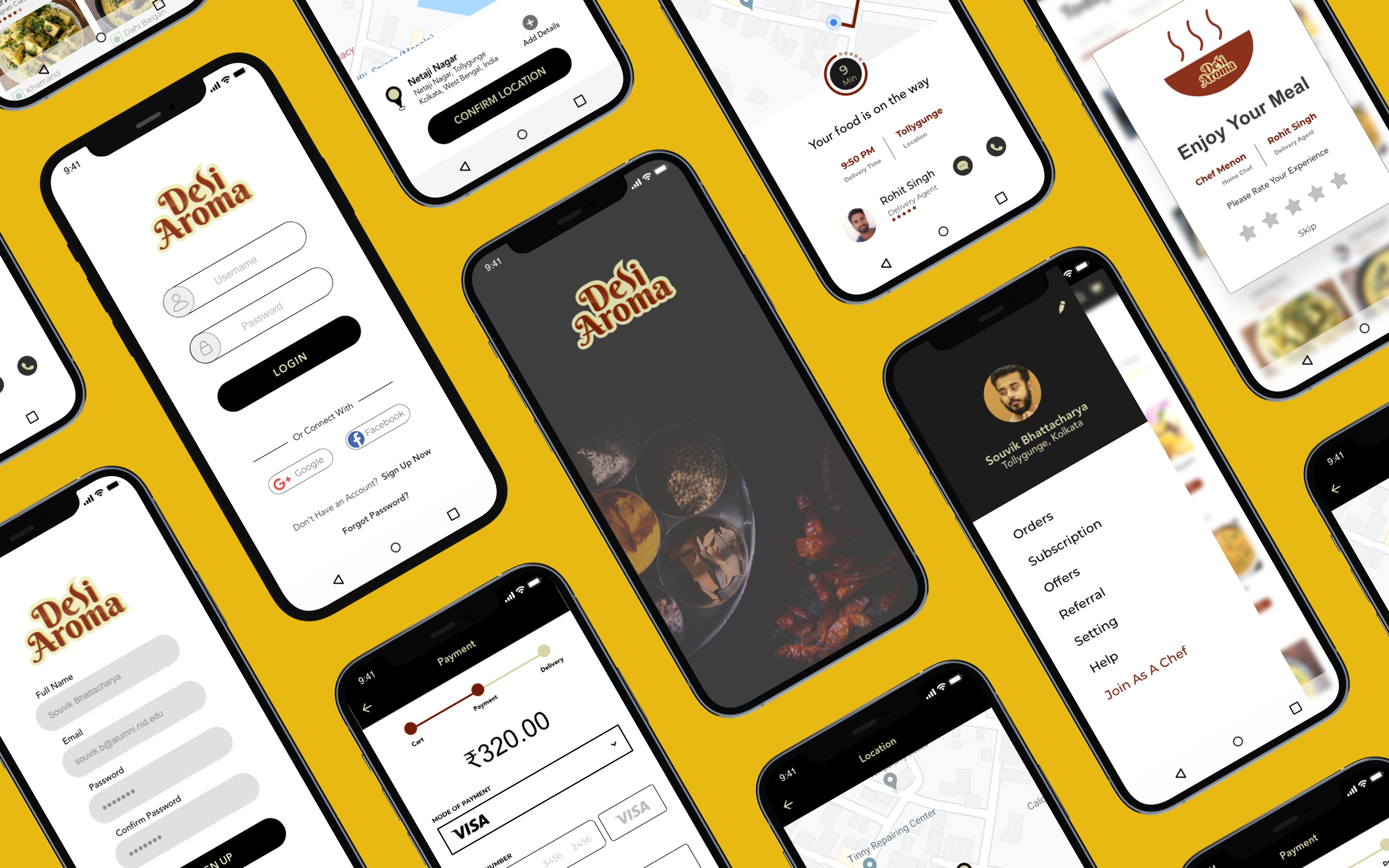
An app-based platform was envisioned as part of the scaling strategy, and a prototype was developed to demonstrate its functionality and potential.
Explore Other Client Projects



Reimagining Applications with AI
PitchHub
Google's sales enablement team creates hundreds of MVPs each quarter, demonstrating how Vertex AI integrates with diverse applications. As consultants, we ran a pilot project to prove we could take over this process, delivering scalable MVP development for Google.
Client
Google (Vertex AI – Sales Enablement Team)
Duration
2 weeks
Industry
AI & Cloud Computing
Scope of work
SaaS
AI-Driven
No-code
System-Level Analysis of gandhinagar
Primary & Secondary Research • Focus Groups • System Mapping • Insights Articulation • Opportunity Mapping
The above shows a system map of Gandhinagar.
From Observations to Insights
Synthesizing user interviews and discussions to uncover patterns, needs, and opportunities that informed design decisions.
- Limited time to cook → dependence on restaurants
- Carrying home-cooked food leads to cold, soggy meals
- Strong need for fresh, homemade food
- Existing services lack authentic home-style taste
- Willingness to pay ₹100–₹150 for non-veg meals
- Cost sensitivity; preference for simple packaging
- Quantity transparency expected in online menus
- Demand for personalization and portion options
- Family approval is critical for homemakers' participation
- Homemakers' schedules revolve around family needs
- Retired individuals seek meaningful engagement
- Stored homemade snacks fit anytime consumption needs
- Cook selection is key to consistent homemade taste
- Limited local market → right customer targeting needed
- Importance of tracking customer preferences
- Loyalty requires assurance and stability for home chefs
Comparative Analysis
A comparative study was conducted to benchmark existing services, understand gaps in homemaker recognition, and identify best practices in community-driven food initiatives.
*Original artifacts shown as-is in 2018, not recreated. Please use the custom-built zoom feature to view the research text in detail.
Stakeholder Mapping
Mapped stakeholders to understand roles, influence, and interactions within the service ecosystem.
*Original artifacts shown as-is in 2018, not recreated. Please use the custom-built zoom feature to view the research text in detail.
Journey Mapping
Mapped end-to-end journeys for chefs and customers to uncover pain points, opportunities, and key touchpoints.
*Original artifacts shown as-is in 2018, not recreated. Please use the custom-built zoom feature to view the research text in detail.
Service Blueprint
A service blueprint was developed to align user interactions with operational processes and dependencies.
*Original artifacts shown as-is in 2018, not recreated. Please use the custom-built zoom feature to view the research text in detail.
Brand Building
Brand Strategy • Identity Design • Social Media Campaigns • Marketing Collaterals • Packaging Design • Sourcing • Brand Awareness
*Original artifacts shown as-is in 2018, not recreated. Please use the custom-built zoom feature to view the research text in detail.
Concept Video
A concept video was created to explain the service clearly to stakeholders, helping them understand the vision, features, and benefits.
Service to Interface
User Persona • User Flows • Wireframing • Design System • Prototyping
An app-based platform was envisioned as part of the scaling strategy, and a prototype was developed to demonstrate its functionality and potential.