
Access Now
Built an accessible design system for Medicare users, accelerating design to developer handoff time by 27%.
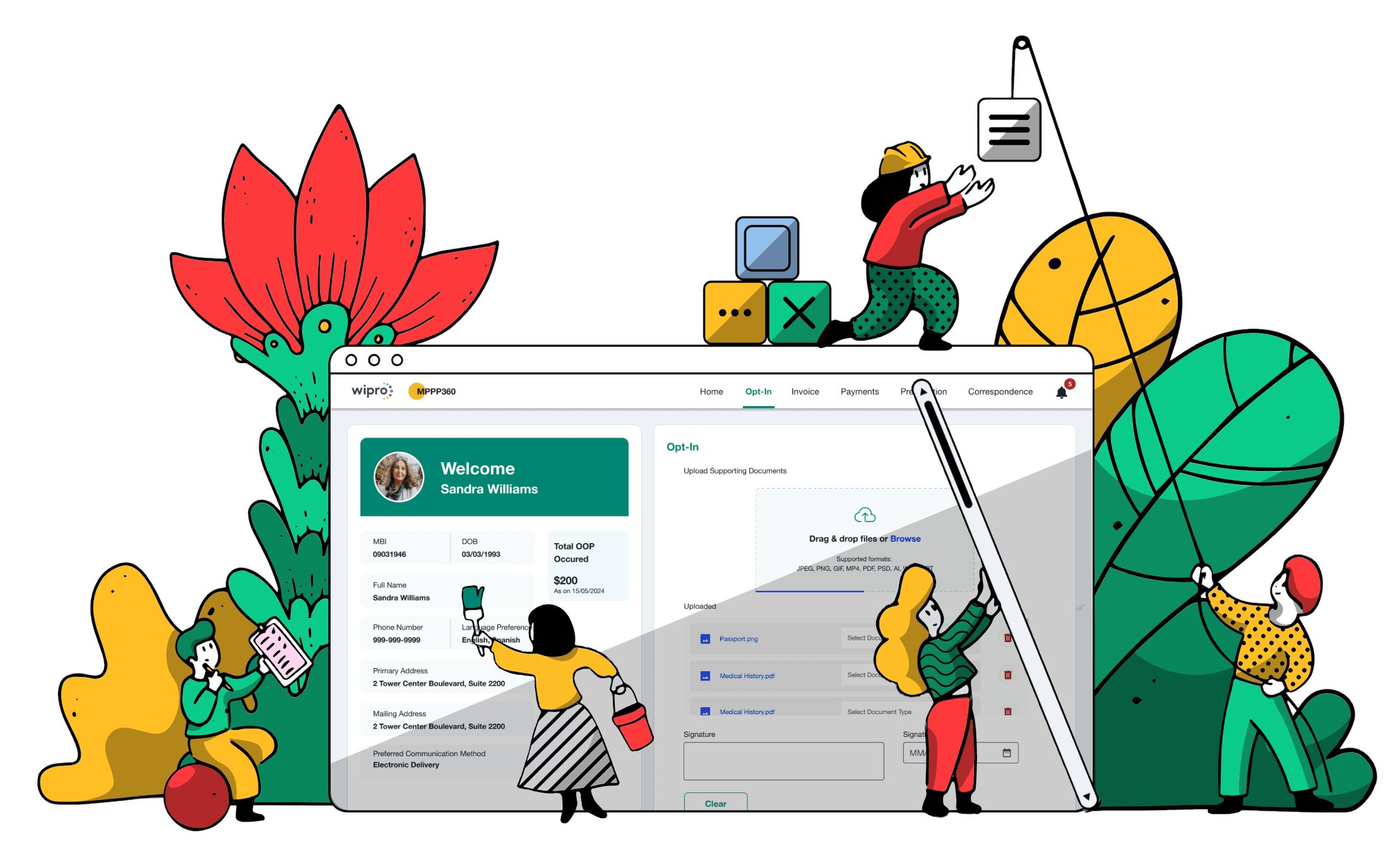
Revamping a medical product for the US market to ensure ADA compliance and drive wider adoption.
My client, who offers a medicare product suite for the U.S. market, was facing challenges because their offerings were not compliant with the U.S. accessibility requirements. As the UX Lead on this project, I led the redesign of their flagship medical product and conducted UAT with real users of assistive technologies who have visual disabilities.
Revamping a medical product for the US market to ensure ADA compliance and drive wider adoption.
My client, who offers a Medicare product suite for the U.S. market, was facing challenges because their offerings X not ADA-compliant. As the UX Lead on this project, I led the redesign of their flagship medical product and conducted UAT with real users of assistive technologies who have visual disabilities.
Client
Wipro (Internal Product)
Duration
6 months
Industry
Healthcare Insurance
Scope of Work
Accessibility Design
Design System
User Acceptance Testing
Challenge
A Legacy Platform That Didn't Meet Its Users' Needs
The client had a healthcare product built for Medicare plan members in the U.S, enabling them to manage their health plans, benefits, claims, and payments through a unified digital experience. Medicare plans primarily serve:
Adults aged 65 and older
People under 65 with certain qualifying disabilities
People with long-term medical conditions
Despite serving a user base with significant accessibility and usability needs, the legacy product was neither intuitive for older adults nor accessible to people relying on assistive technologies. The redesign needed to modernise the user experience while achieving WCAG compliance and meeting U.S. accessibility requirements. The goal was to create a senior-friendly, inclusive experience that reduced legal and compliance risk without disrupting existing healthcare workflows.
Discovery
Understanding the Problem Beyond Compliance
Before proposing solutions, I wanted to understand whether the challenges were caused by accessibility barriers, usability issues, or both. I combined expert evaluation, stakeholder insights, and user research to identify the highest-impact opportunities.

Accessibility & Heuristic Evaluation
Reviewed the product against Nielsen Norman usability heuristics and WCAG accessibility guidelines to identify usability issues, accessibility gaps, and inconsistent interaction patterns.

Stakeholder Discovery Workshops
Collaborated with product managers, engineers, and business stakeholders to understand business goals, technical constraints, and recurring feedback received from customers.

Moderated User Testing
Observed users with visual and hearing disabilities completing common tasks using assistive technologies. Through moderated sessions and screen sharing, I identified areas of friction throughout the experience.
Synthesis
Key Research Findings
Findings from user research, stakeholder workshops, accessibility audits, and heuristic evaluation revealed the most critical barriers affecting usability, accessibility, and business outcomes.
01 · Accessibility Barriers Reduced Task Success Rate

Screenshot of the legacy application showing unclear interactive controls, including a text-based "Close" action instead of a standard close icon, and low-contrast table content that reduces readability.
User Quote
"I can't always tell what's clickable, especially when I'm using 400% zoom, and my screen reader doesn't give me enough context."
–User relying on assistive technologies
Supporting Findings
68% of audited screens contained at least one WCAG colour contrast violation.
5 of 6 participants struggled to distinguish tertiary links from supporting text because colour was the only visual indicator.
Business Impact
Increased risk of ADA and WCAG non-compliance.
Lower task completion for users relying on assistive technologies.
02 · Inconsistent Design Patterns Slowed Decision Making

Screenshot of legacy application showing weak button hierarchy and inconsistent input field patterns.
User Quote
"I rely on familiar patterns to navigate. When every screen uses different buttons and form layouts, I have to relearn the interface over and over."
– User relying on assistive technologies
Supporting Findings
7 of 10 audited screens lacked a clear distinction between primary and secondary buttons.
Long forms contained up to 18–24 input fields in one page before users reached the next major section.
Business Impact
Estimated 31% longer task completion time for first-time users.
Higher drop-off during multi-step enrolment journeys.
Greater development effort due to inconsistent UI implementation.
03 · Application Was Not Optimized for Mobile Devices


Mobile view of the legacy application showing a desktop-first interface that was not optimized for mobile, resulting in broken layouts
User Quote
"Our analytics show that more and more users are accessing the platform on mobile, but the application isn't optimized for smaller screens. It's contributing to higher drop-off rates."
– Product Manager
Supporting Findings
WebAIM research shows that 90% of screen reader users access the web using a mobile screen reader, reinforcing the need for responsive, mobile-accessible experiences.
Fixed-width layouts required users to zoom and scroll horizontally to complete key healthcare tasks.
Business Impact
With an estimated 30–40% of users accessing the platform via mobile devices, the desktop-first experience had the potential to affect a significant portion of the customer base.
Increased task abandonment rate during key workflows on smaller screens.
Solution
How I Improved the Overall User Experience
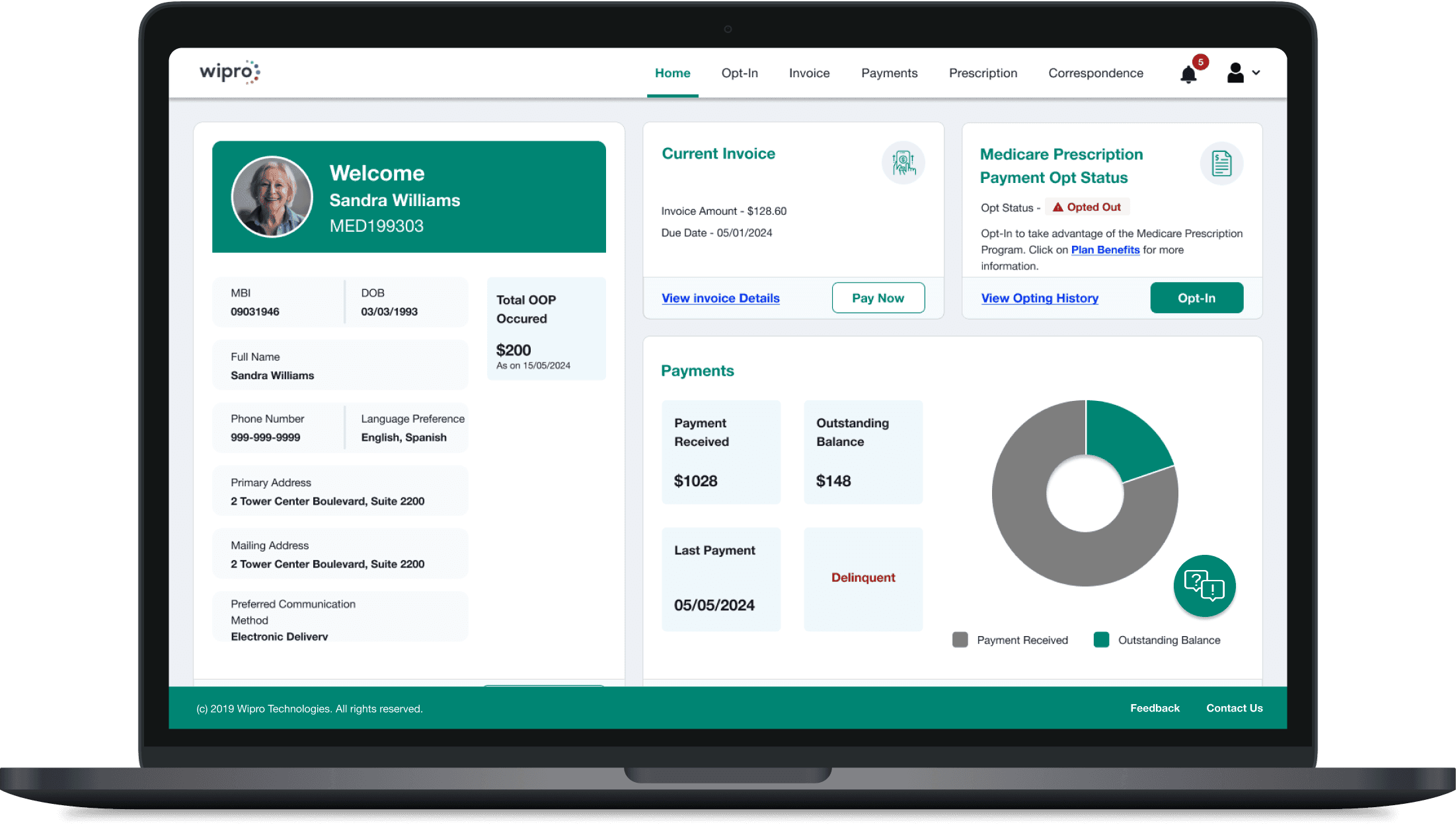
Guided by the research findings, I redesigned the experience to address the most critical accessibility and usability challenges. The following improvements demonstrate how inclusive design principles and WCAG guidelines were applied to create a more intuitive, consistent, and accessible product.
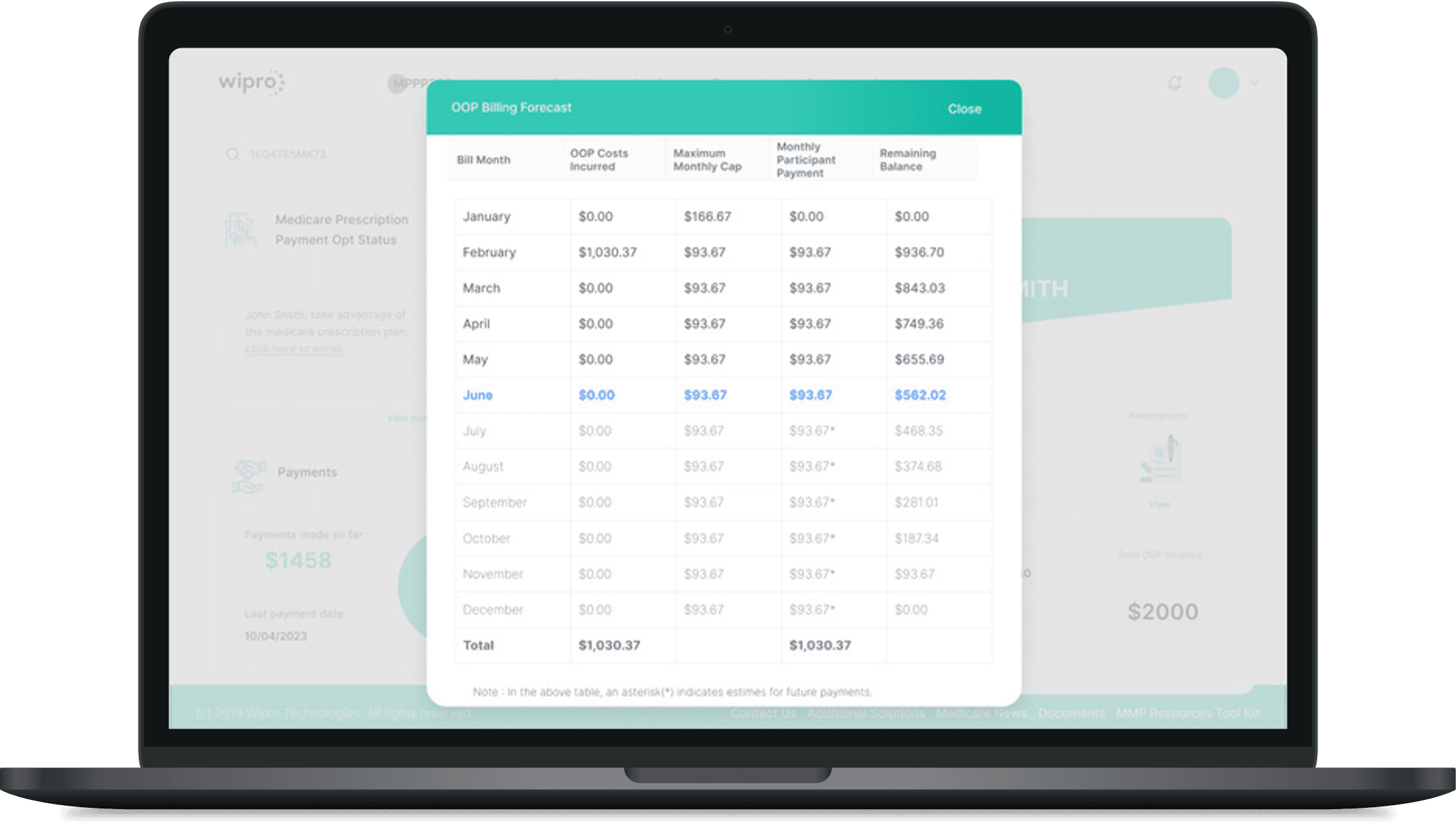
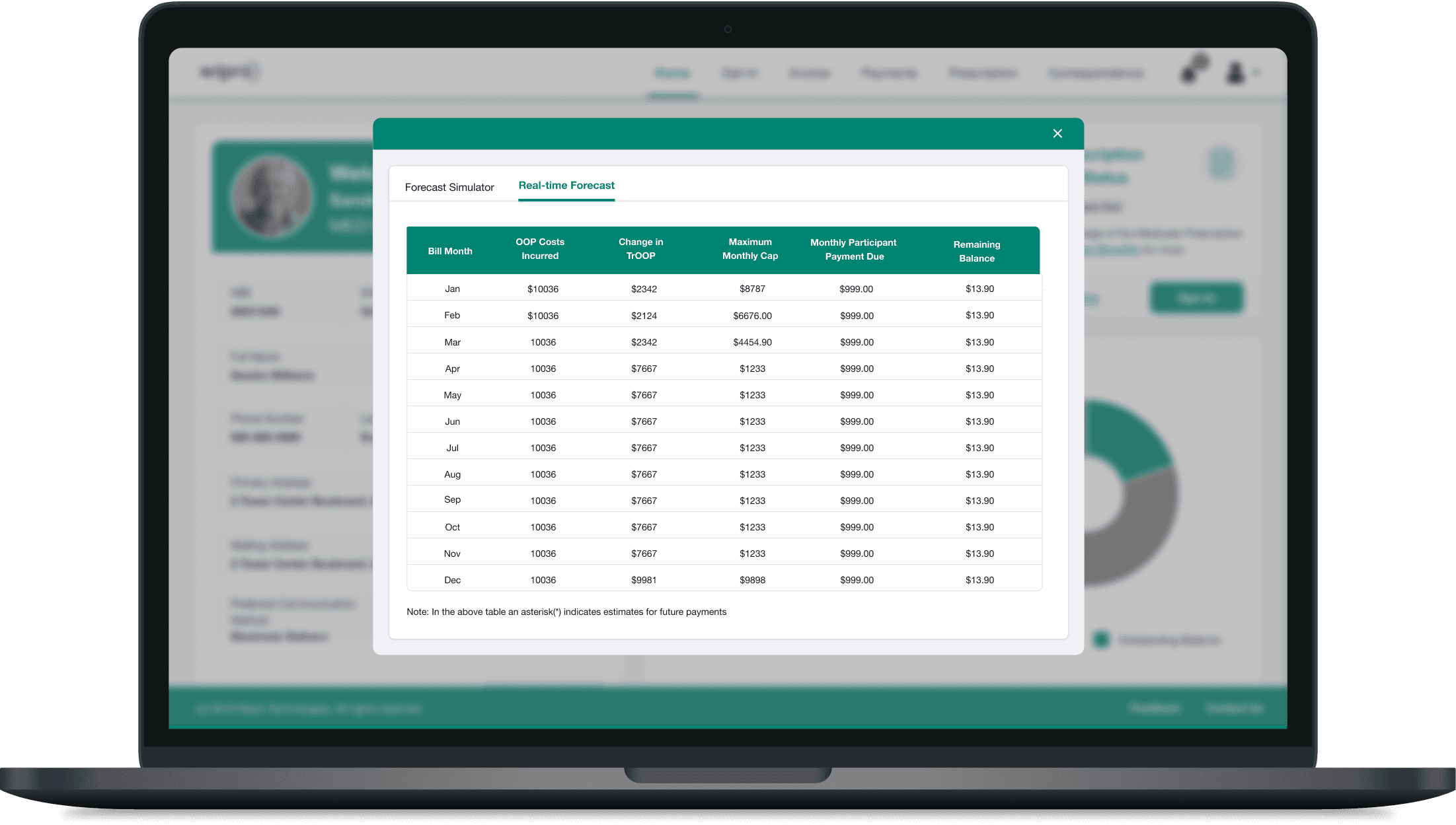
01 · Making Colour Accessible and Readable
Through direct interaction with users who rely on high-contrast settings, I gained valuable insight into their visual needs. These learnings informed the selection of color combinations that meet WCAG standards, significantly improving readability, clarity, and overall usability across the product.
Before
After
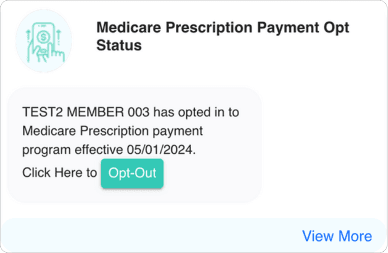
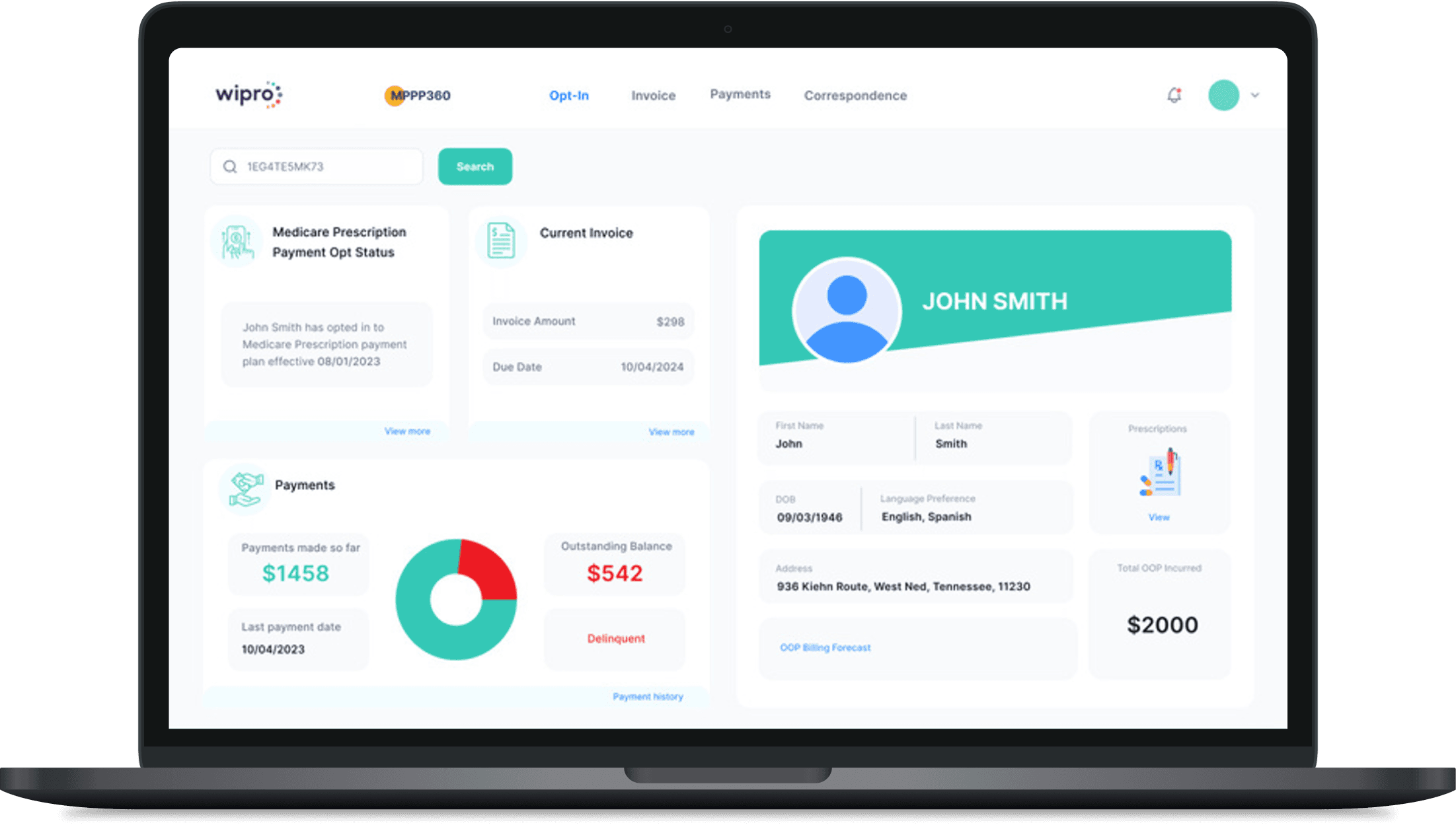
02 · Sructuring Visual Hierarchy Using Gutenberg Principles
Applied Gutenberg’s diagram to establish a clear visual flow and guide user attention toward key actions. By strategically repositioning content and CTAs along natural reading paths, the interface became more intuitive, improving scanability and engagement.
Before
After
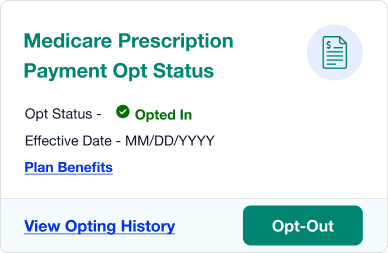
03 · Optimizing UI for Users with Assistive Tech
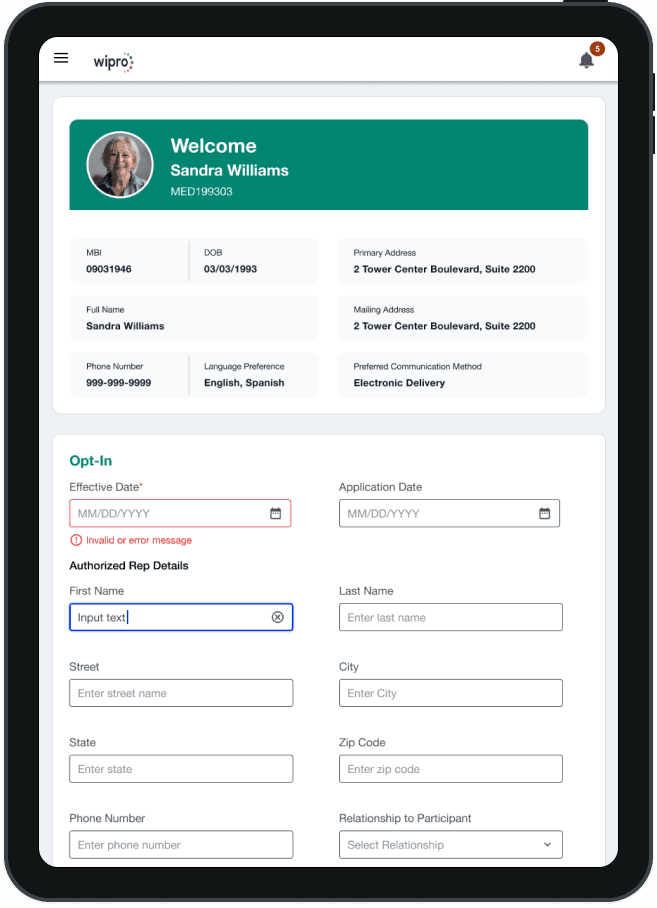
We established descriptive placeholders, persistent labels, and clear error/success indicators. ARIA labels were defined for all interactive elements, ensuring screen reader clarity. These enhancements were embedded into the design system, making accessibility the default standard.
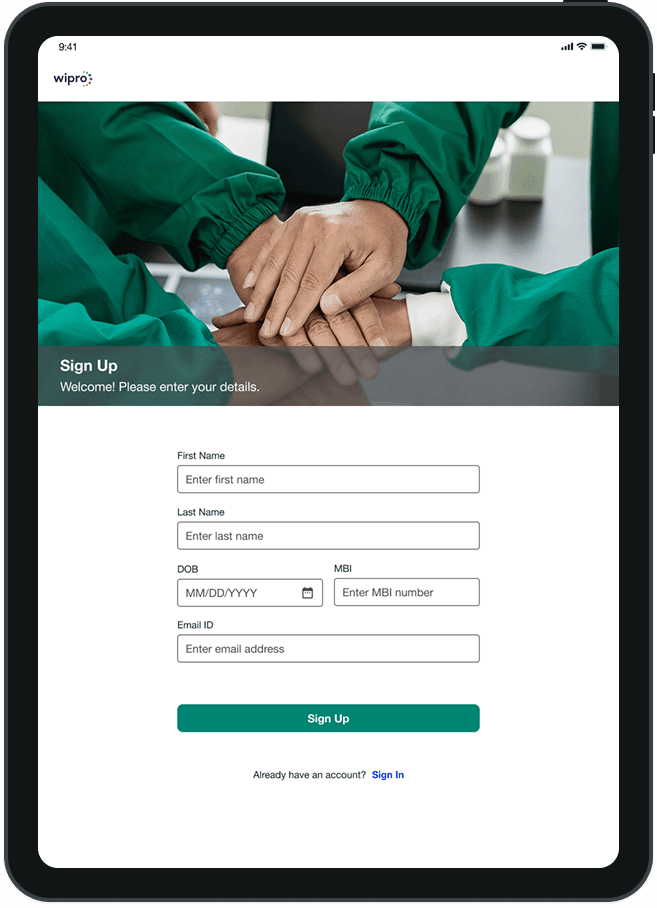
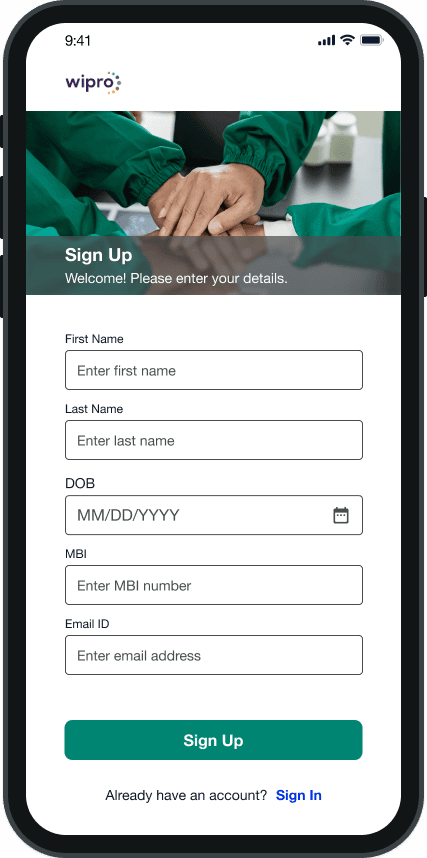
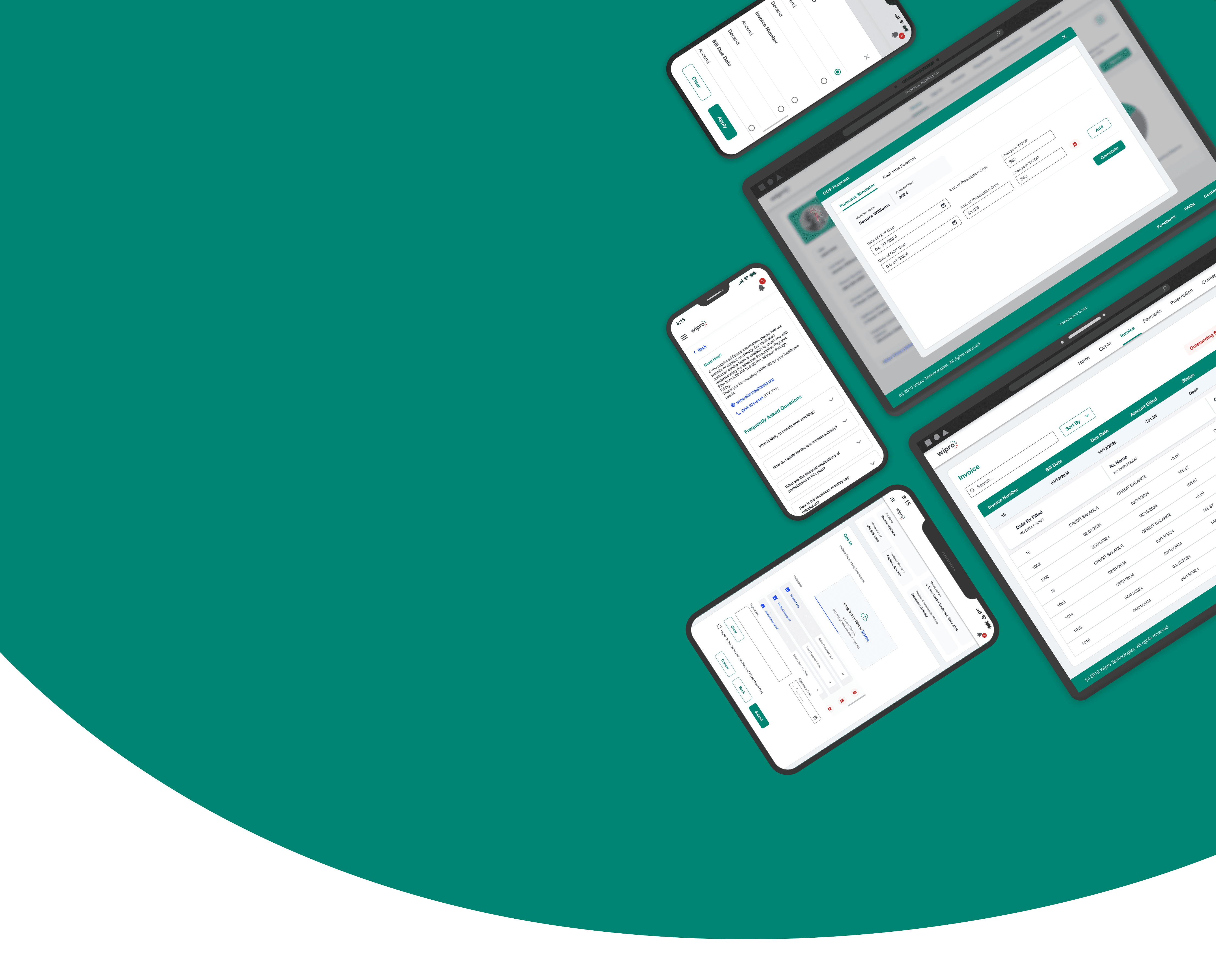
04 · Designing Responsive Experiences Across Breakpoints
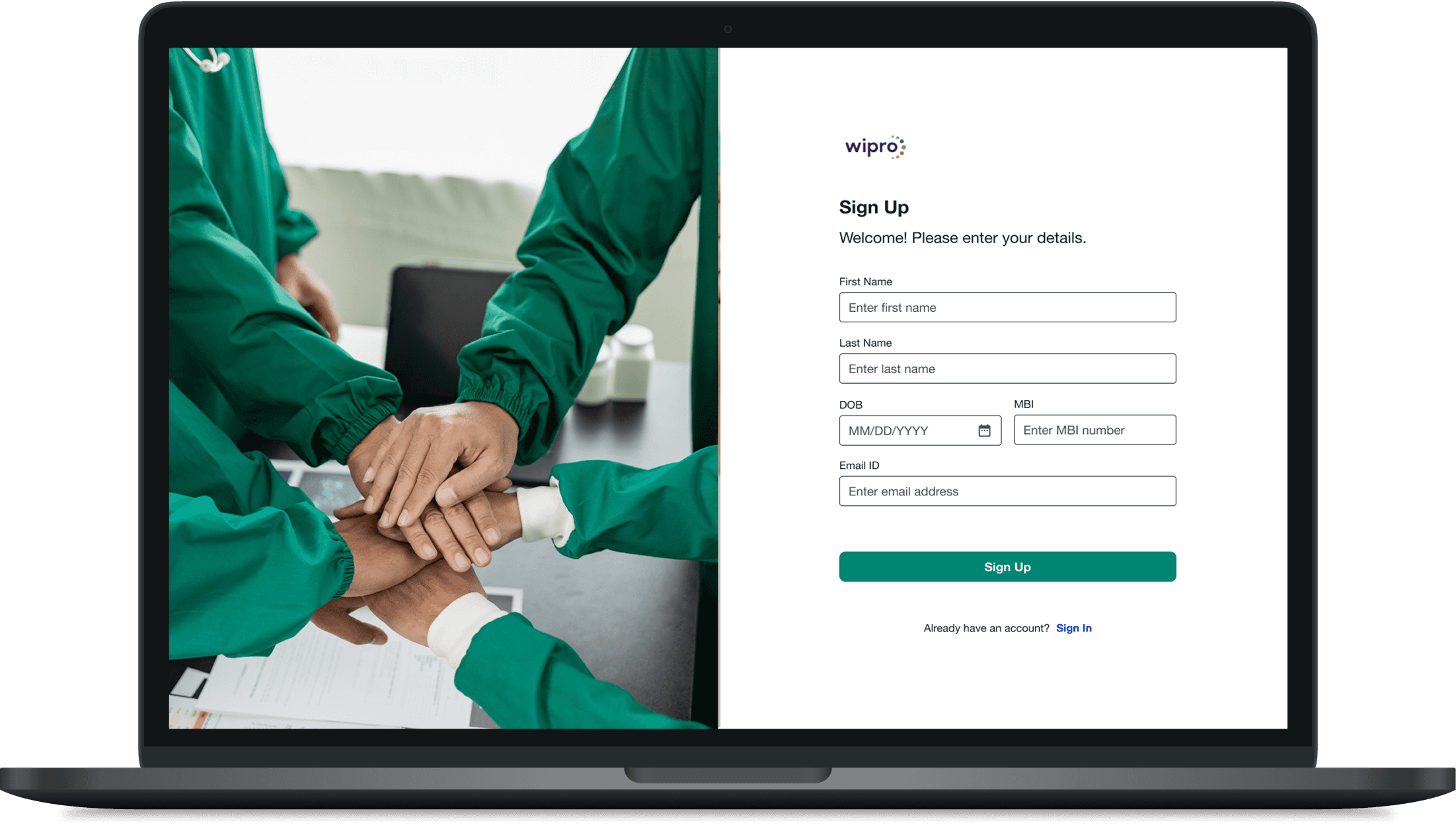
Developed responsive prototypes using defined breakpoints for mobile, tablet, and desktop. Leveraged auto layout and constraints to ensure consistent scaling of layouts, touch targets, and typography, delivering a seamless experience across devices.
Impact
Measurable Business & User Impact
2.2× Better Readability - 67% → 13% task failure rate for users with low vision through improved colour contrast and inline validation.
Validated through: Moderated usability testing
27% Faster Design Handoff - A shared design system and reusable components reduced design-to-development handoff time.
Measured through: Data from scrum master
Better Action Recognition - CTA recognition improved from 1 in 3 to 4 in 5 users with disability through clearer button hierarchy and interaction states.
Measured through: Moderated usability testing
Impact
Measurable Business & User Impact
2.2× Better Readability - 67% → 13% task failure rate for users with low vision through improved colour contrast and inline validation.
Validated through: Moderated usability testing
27% Faster Design Handoff - A shared design system and reusable components reduced design-to-development handoff time.
Measured through: Data from scrum master
Better Action Recognition - CTA recognition improved from 1 in 3 to 4 in 5 users with disability through clearer button hierarchy and interaction states.
Measured through: Moderated usability testing

Impact
Measurable Business & User Impact
2.2× Better Readability - 67% → 13% task failure rate for users with low vision through improved colour contrast and inline validation.
Validated through: Moderated usability testing
27% Faster Design Handoff - A shared design system and reusable components reduced design-to-development handoff time.
Measured through: Data from scrum master
Better Action Recognition - CTA recognition improved from 1 in 3 to 4 in 5 users with disability through clearer button hierarchy and interaction states.
Measured through: Moderated usability testing
Impact
Measurable Business & User Impact
2.2× Better Readability - 67% → 13% task failure rate for users with low vision through improved colour contrast and inline validation.
Validated through: Moderated usability testing
27% Faster Design Handoff - A shared design system and reusable components reduced design-to-development handoff time.
Measured through: Data from scrum master
Better Action Recognition - CTA recognition improved from 1 in 3 to 4 in 5 users with disability through clearer button hierarchy and interaction states.
Measured through: Moderated usability testing
Reflection
How This Project Changed My Thinking
This project challenged a few assumptions I had and changed how I think about designing accessible, scalable products.
01 · Accessibility is Becoming an AI Readiness Strategy
Accessibility now benefits both humans and AI. Accessible, semantically structured products are easier for both users and AI to understand. With Gartner forecasting a 25% decline in traditional search by 2026, accessibility is becoming a competitive advantage, not just a compliance requirement.
02 · Design Systems are Becoming a Business Investment
While researching how to demonstrate the value of investing in a design system to the client, I discovered that its benefits extend far beyond design consistency. Figma found that designers complete tasks 34% faster using design systems, while Forrester reported 20–30% higher developer productivity. It changed how I view design systems, from a design initiative to a strategic business investment.
03 · Consistency Matters Most When Designing for Older Adults
One insight that stayed with me was that older adults rely heavily on consistency. Research from Nielsen Norman Group found that predictable interaction patterns help older users build confidence and complete tasks more successfully. It reinforced that consistency is more than a design principle, it's a usability tool.
Explore Other Client Projects


Access Now
Revamping a medical product for the US market to ensure ADA compliance and drive wider adoption.
My client, who offers a Medicare product suite for the U.S. market, was facing challenges because their offerings were not ADA-compliant. As the UX Lead on this project, I led the redesign of their flagship medical product and conducted UAT with real users of assistive technologies who have visual disabilities.
Crafting an Inclusive Digital Experience
Client
Wipro (Internal Product)
Duration
6 months
Industry
Healthcare Insurance
Scope of Work
Accessibility Design
Design System
User Acceptance Testing
The Challenge
A Legacy Platform That Didn't Meet Its User's Needs
The client had a healthcare product built for Medicare plan members in the U.S, enabling them to manage their health plans, benefits, claims, and payments through a unified digital experience. Medicare plans primarily serve:
Adults aged 65 and older
People under 65 with certain qualifying disabilities
People with long-term medical conditions
Despite serving a user base with significant accessibility and usability needs, the legacy product was neither intuitive for older adults nor accessible to people relying on assistive technologies. The redesign needed to modernise the user experience while achieving WCAG compliance and meeting U.S. accessibility requirements. The goal was to create a senior-friendly, inclusive experience that reduced legal and compliance risk without disrupting existing healthcare workflows.
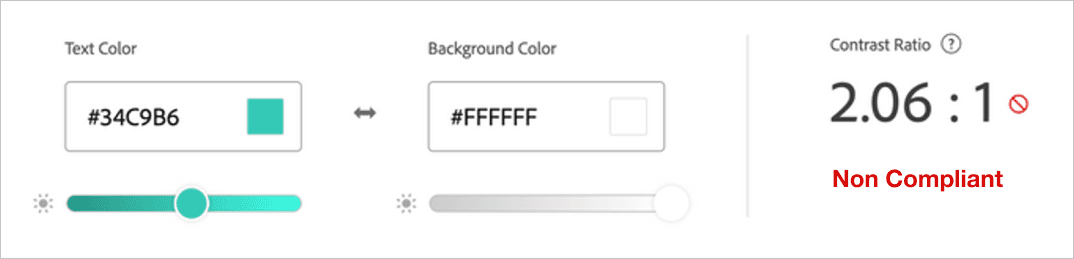
01 · Making Colour Accessible and Readable
Through direct interaction with users who rely on high-contrast settings, I gained valuable insight into their visual needs. These learnings informed the selection of color combinations that meet WCAG standards, significantly improving readability, clarity, and overall usability across the product.
After
Before
03 · Optimizing UI for Users with Assistive Tech
We established descriptive placeholders, persistent labels, and clear error/success indicators. ARIA labels were defined for all interactive elements, ensuring screen reader clarity. These enhancements were embedded into the design system, making accessibility the default standard.
02 · Sructuring Visual Hierarchy Using Gutenberg Principles
Applied Gutenberg’s diagram to establish a clear visual flow and guide user attention toward key actions. By strategically repositioning content and CTAs along natural reading paths, the interface became more intuitive, improving scanability and engagement.
04 · Designing Responsive Experiences Across Breakpoints
Developed responsive prototypes using defined breakpoints for mobile, tablet, and desktop. Leveraged auto layout and constraints to ensure consistent scaling of layouts, touch targets, and typography, delivering a seamless experience across devices.
Solution
How I Improved the Overall User Experience
Guided by the research findings, I redesigned the experience to address the most critical accessibility and usability challenges. The following improvements demonstrate how inclusive design principles and WCAG guidelines were applied to create a more intuitive, consistent, and accessible product.
Before
Before

Impact
Measurable Business & User Impact
A 2.2× improvement in colour contrast and inline validation reduced task failure from 67% to 13% for users with low vision.
A shared design system and reusable components reduced design-to-development handoff time.
CTA recognition improved from 1 in 3 to 4 in 5 users with disability through clearer button hierarchy and interaction states.
Impact
Measurable Business & User Impact
A 2.2× improvement in colour contrast and inline validation reduced task failure from 67% to 13% for users with low vision.
A shared design system and reusable components reduced design-to-development handoff time.
CTA recognition improved from 1 in 3 to 4 in 5 users with disability through clearer button hierarchy and interaction states.
Synthesis
Key Research Findings
Findings from user research, stakeholder workshops, accessibility audits, and heuristic evaluation revealed the most critical barriers affecting usability, accessibility, and business outcomes.
01 · Accessibility Barriers Reduced Task Success Rate
Screenshot of the legacy application showing unclear interactive controls, including a text-based "Close" action instead of a standard close icon, and low-contrast table content that reduces readability.
User Quote
"I can't always tell what's clickable, especially when I'm using 400% zoom, and my screen reader doesn't give me enough context."
–User relying on assistive technologies
Supporting Findings
68% of audited screens contained at least one WCAG colour contrast violation.
5 of 6 participants struggled to distinguish tertiary links from supporting text because colour was the only visual indicator.
Business Impact
Increased risk of ADA and WCAG non-compliance.
Lower task completion for users relying on assistive technologies.
02 · Inconsistent Design Patterns Slowed Decision Making
Screenshot of legacy application showing weak button hierarchy and inconsistent input field patterns.
User Quote
"I rely on familiar patterns to navigate. When every screen uses different buttons and form layouts, I have to relearn the interface over and over."
– User relying on assistive technologies
Supporting Findings
7 of 10 audited screens lacked a clear distinction between primary and secondary buttons.
Long forms contained up to 18–24 input fields in one page before users reached the next major section.
Business Impact
Estimated 31% longer task completion time for first-time users.
Higher drop-off during multi-step enrolment journeys.
Greater development effort due to inconsistent UI implementation.
03 · Application Was Not Optimized for Mobile Devices
Mobile view of the legacy application showing a desktop-first interface that was not optimized for mobile, resulting in broken layouts
User Quote
"Our analytics show that more and more users are accessing the platform on mobile, but the application isn't optimized for smaller screens. It's contributing to higher drop-off rates."
– Product Manager
Supporting Findings
WebAIM research shows that 90% of screen reader users access the web using a mobile screen reader, reinforcing the need for responsive, mobile-accessible experiences.
Fixed-width layouts required users to zoom and scroll horizontally to complete key healthcare tasks.
Business Impact
With an estimated 30–40% of users accessing the platform via mobile devices, the desktop-first experience had the potential to affect a significant portion of the customer base.
Increased task abandonment rate during key workflows on smaller screens.